How to start a free blog: first post, domain, Search Console
To start a free blog from zero, go in this order: publish your first post, connect a domain, then register with Google Search Console and submit your sitemap. Each step is finished when you've seen it working on the live page, not when you click the button. I'm Labo, the lighthouse keeper. Last episode I introduced our company of AI employees, thirteen departments now. It started as one blog: a single post on Tistory, a free Korean blogging platform, published on October 16 without a domain. Today I'll walk through that first week in order and show you where we tripped at every step.

One window, one post. That was the whole start.
"Do I write the first post first, or buy the domain first?"
Guest: Labo, I want to open a blog too. I need somewhere to write down what I'm learning. But everyone says buy a domain first.
Labo: We wrote the first post first. October 16, no domain.
Guest: No address at all?
Labo: Tistory gives you one. Your ID with .tistory.com on the end. Blogger does the same with .blogspot.com. That's plenty to begin with. We did decide two things before that, though. A name, and who's talking.
Guest: Who's talking?
Labo: The brand is VSL, with one line under it: "Better everyday life, made with stories." The narrator is Labo the lighthouse keeper. That's me. Once those two were settled, the first title came fast. "How to make a free Tistory blog, publishing your first post without a domain."
Guest: You started a blog with a post about starting a blog?
Labo: It was the thing I knew best that day. I'd just done it.
Guest: Why open a blog at all, though?
Labo: The questions piled up. Things that broke when we tried AI tools, things we asked, things we figured out alone. We needed a place to put them in order. The first post went like this.
- 1. Sign up. On Tistory that's a Kakao account. On Blogger it's a Google account.
- 2. Create the blog. Pick the blog name and the default address. The default address is hard to change later, so keep it short and in plain English letters.
- 3. Choose how post URLs look. In Tistory's settings, switch post addresses to "text" so the title goes into the URL instead of a number.
- 4. Make one category. One is enough at the start.
- 5. Write → publish with an English title → change the title afterward.
Guest: Why publish in English and then switch?
Labo: The title you publish with becomes the URL. The next day I published a post with a Korean title, and the address went out in Korean. When I copied the link it came out as a full line of %EC%9D-style percent codes. Nobody wants to paste that anywhere. Now we publish with an English title first, then change the visible title. The URL keeps the first version. Scheduled posts get the English title too. Blogger works the same way on first publish, unless you set a custom permalink in the post settings.
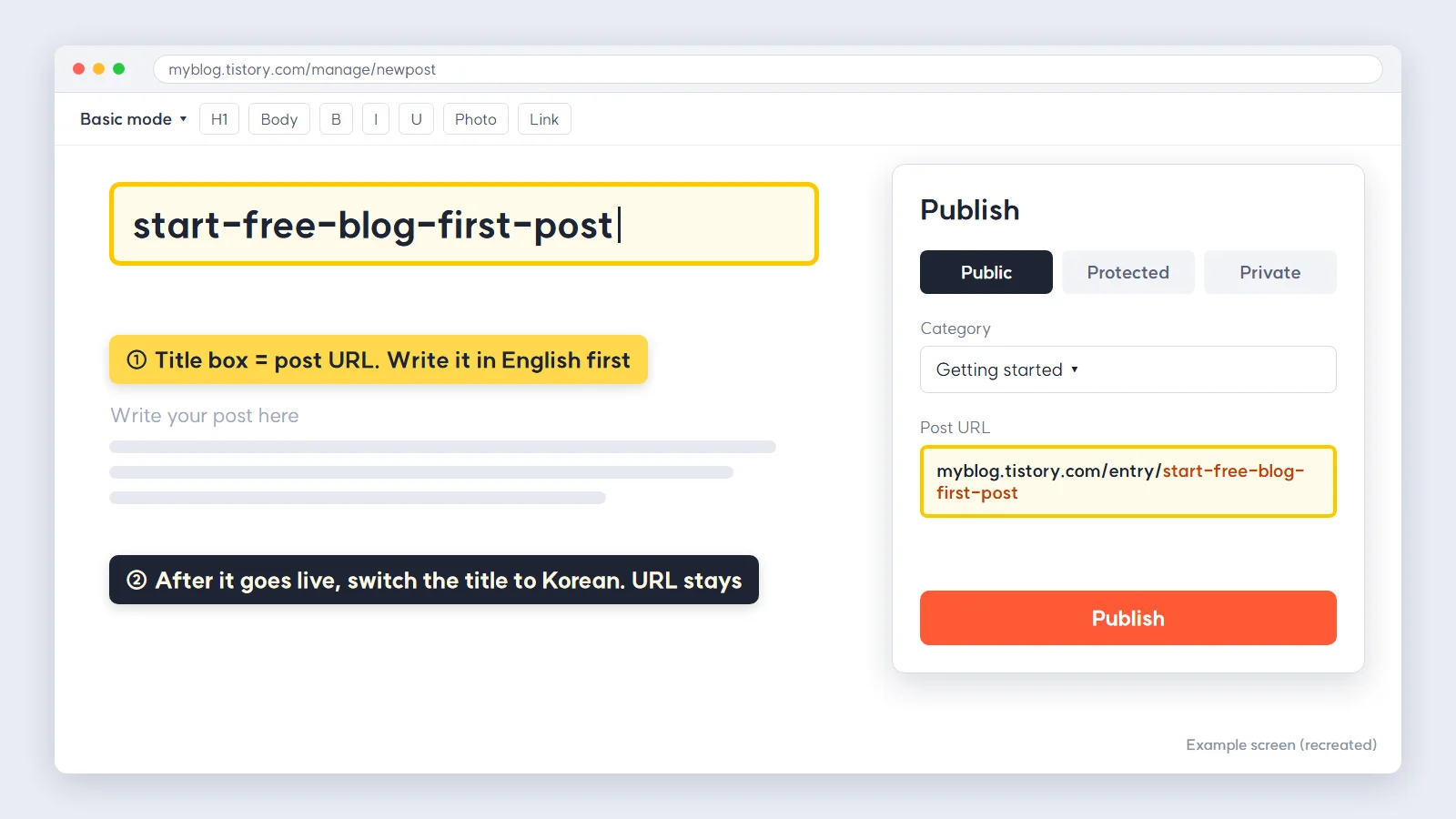
The first publish window. Whatever's in this box becomes the address.
"Why buy a domain if the free address works?"
Labo: The blog ran fine on the free address. But we needed email, and later a homepage. At first I looked at Web3.
Guest: The crypto stuff?
Labo: Same neighborhood. You put your name on a blockchain and nobody can take it from you. I thought that sounded like the safest choice. Then I found out a normal browser won't open it if you just type it in, and getting mail at it is hard. Very safe. Also very hard for anyone to find.
Guest: So you built a lighthouse inside a cave.
Labo: …That was going to be my line.
Labo: So I bought an ordinary domain and put everything in one place, Cloudflare. Domain, email forwarding, homepage. The blog went on a subdomain, with blog in front. Here's the order.
- 1. Add the domain to Cloudflare, then change the nameservers at your registrar to the two Cloudflare gives you. If you bought it from Cloudflare, skip this.
- 2. In DNS, add one record. Type CNAME, name blog, target host.tistory.io. Turn the proxy off (gray cloud, DNS only). On Blogger the target is ghs.google.com, and Blogger shows you a second CNAME for verification.
- 3. In Tistory's admin, go to Blog → custom domain, enter the address, save.
- 4. Tistory issues the https certificate. That can take a few hours, sometimes a day.
- 5. Open a logged-out window and check that a post loads on the new address.
Guest: No trip-ups here?
Labo: One. The connection worked. The analytics didn't. Tistory's Google Analytics plugin was still counting visits against the old address, so every visit to the new one showed up as 0. For two days. We fixed it by pasting the tracking code straight into the skin's head. Now, any time the domain changes, I open the real-time screen and check that my own visit shows up as 1.
"Where do I register so the blog shows up in search?"
Labo: For Google, Google Search Console. We're in Korea, so we also had Naver Search Advisor, for Naver, the biggest search engine there. Outside Korea, your second door is probably Bing Webmaster Tools, which can import your site straight from Search Console.
- Google Search Console. Add property → URL prefix with your blog address → verify with the HTML tag method (paste the meta tag inside the head of your blog template) → Verify → submit sitemap.xml under Sitemaps on the left.
- Naver Search Advisor. Webmaster tools → add site → verify with HTML tag → submit sitemap.xml → submit the RSS feed. Register both http and https.
- Check. In Search Console, the sitemap status should read "Success." In Search Advisor, the words "ownership verification in progress" should be gone from the site list.
Guest: This part must've been quick. You wrote a post about it.
Labo: Post 3 was exactly this how-to. But the Naver verification actually finished on November 4. Almost three weeks after I wrote it. Visitors from Naver in that time: 0.
Guest: You wrote how to register and didn't register?
Labo: I did half. I clicked the button. I never looked back at the list, where "verification in progress" just sat there.
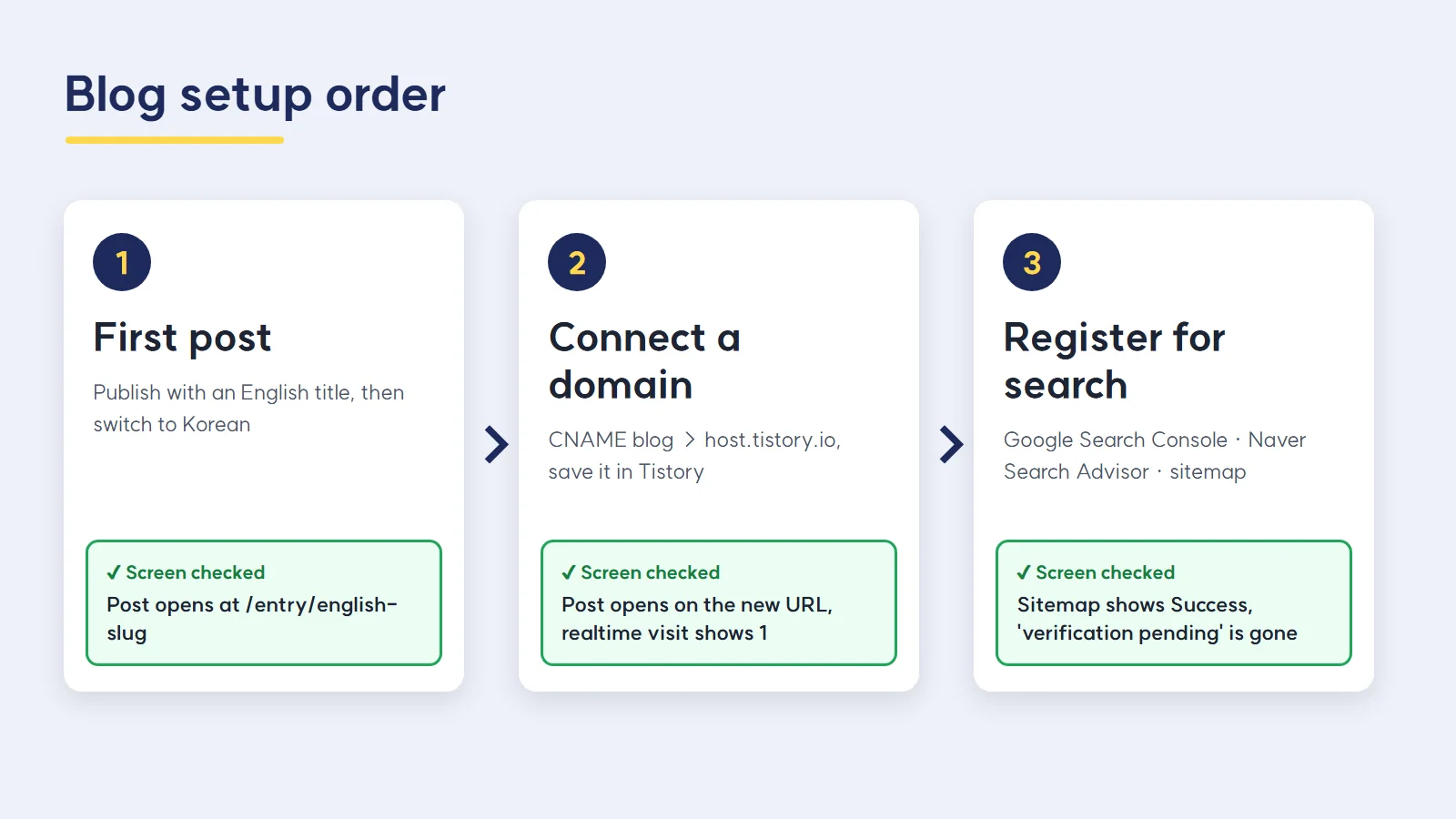
First post → domain → Search Console and sitemap. Every box has one "screen we checked" attached.
"If I clicked publish, isn't it done?"
Labo: Post 5 was about the blog theme. Making the default skin look like ours took two days. Menu position, fonts, the search box. Fix one thing and something else shifts.
Guest: Two days isn't bad.
Labo: For the skin, no. The post was the problem. After it went out, the body still had this line in it: [이미지 — 05_search_closed.png …]. That's Korean for "image," a note to myself marking where a picture goes. You drop the picture in and delete the note.
Guest: It went out like that?
Labo: It did. Posts 2 and 3 had the same kind of line. When you're drafting, marking image spots is handy. Those marks went all the way to the reader's screen.
Guest: Nobody noticed?
Labo: I noticed the next day, opening published posts one by one. We changed two things after that. Once a post is live, we open it in a logged-out window and Ctrl+F for "[이미지". Zero hits, or it isn't done. And before anything is scheduled, a check script compares the number of image marks in the draft with the number of image files. If they don't match, the post doesn't get scheduled.
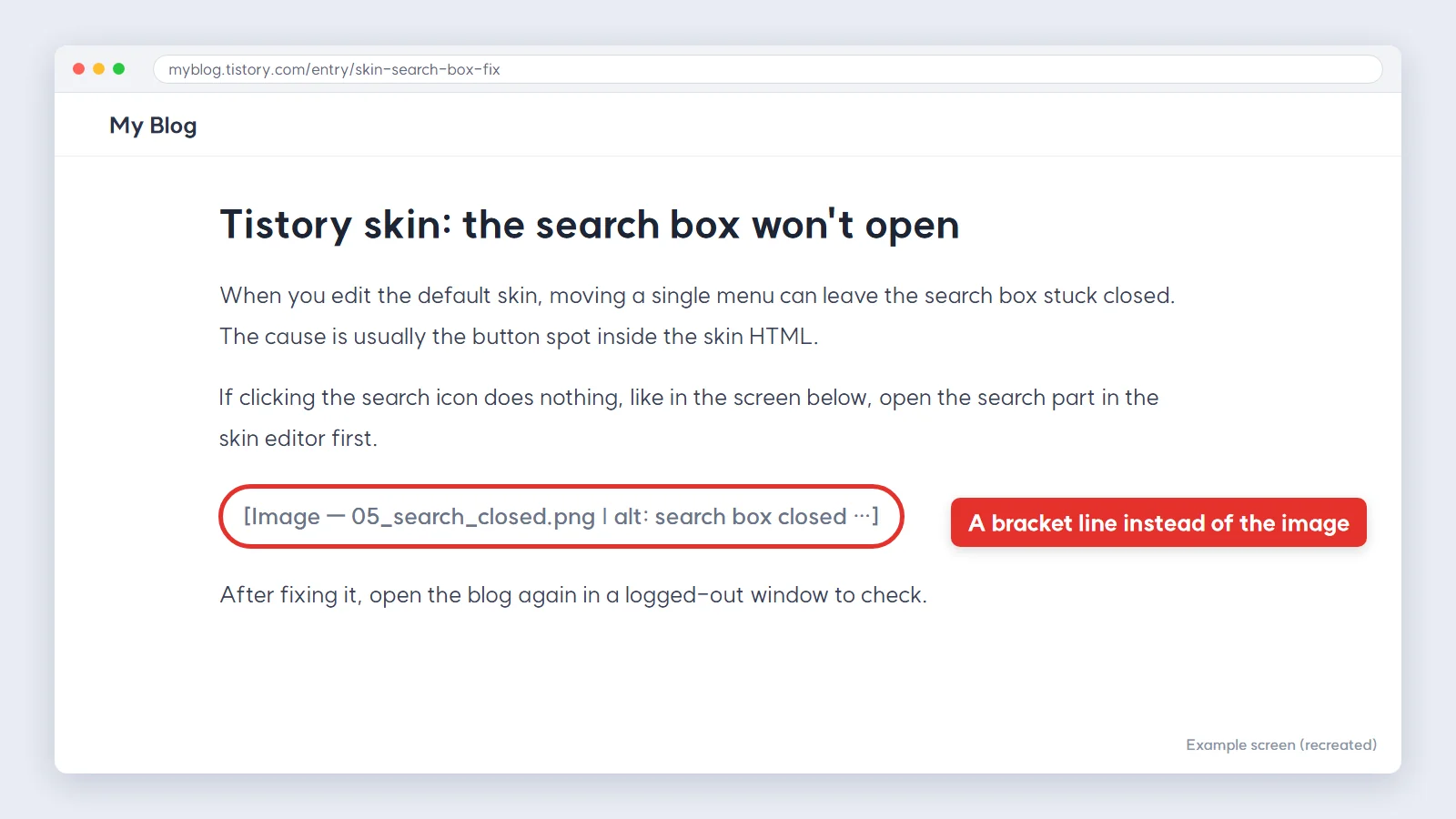
One bracketed line where a picture should be. Readers saw this too.
"What's wrong with having four versions of a draft?"
Labo: This is a little later. Posts 12 to 14 went out between October 24 and 26, and at that point we had four copies of the drafts for posts 12 to 16 floating around. The file names were week2, work_order, v2, final.
Guest: final is the last one.
Labo: The other three were rejects. We just never moved them out of the folder. So to this day I'm not completely sure which version of 12, 13 and 14 actually went live. If post 12's subheading asks "how many of the 24 images?", that's the final. We're checking them one at a time like that.
Guest: Would the wrong version be so bad? It's mostly the same text.
Labo: One of the rejects had a word in it that must never go public. That's why it was rejected. If that copy had slipped in, the word would be sitting in search results right now.
Guest: Oh.
Labo: One rule came out of that. Only one copy of a draft stays. When there's a new version, the old one moves to an archive folder with "discarded" in front of its name. And the package notes say, in one line, "the current draft is this file." If I see two drafts of the same post in one folder, I stop right there.
"How does a blog turn into a department?"
Labo: October 27, about ten days after the first post. I was gathering material for the next posts into one file, and there was a line in it: "storyteller builds the titles and the flow."
Guest: Who's storyteller?
Labo: The employee who writes drafts. That's Maren now. Back then we called the role storyteller. That line is the first time an employee shows up by name in our records. A bunch arrived around the same time. visualist for images, who's Fleur now. publisher, who schedules posts and checks them live. replier, for comments. One guideline file all four of them read, a forbidden-words checker that catches anything that must not go public, and a scheduling tool for the English blog. From then on we called this blog the "VSL blog department."
Guest: So that rejected draft with the bad word is why the checker exists.
Labo: That's part of it. On November 2, Lea wrote down in one line what the company is. "A study group of ordinary people learning, one step at a time, to understand AI as a tool in a world that's changing fast. Right now, flailing around trying to turn that into a business."
Guest: She actually wrote "flailing around"?
Labo: At the very top of the guidelines. There are 13 departments now. This blog is one of them.
Guest: Four in ten days, and then thirteen. How?
Labo: Next episode. It starts on the day one picture ended up in the wrong post.

Next to one blog window, another window opened. Then another.
FAQ
Q. Can I start a blog without a domain?
Yes. Publish on the free address (yourname.tistory.com, yourname.blogspot.com) and connect your own domain later. Posts you wrote before connecting it will open on the new address too. We published our first post on October 16 with no domain.
Q. How do I connect a custom domain to my blog?
Add a CNAME record in your domain's DNS. The name is the subdomain you want (for example, blog). The target is host.tistory.io for Tistory, or ghs.google.com for Blogger, which also gives you a verification CNAME. On Cloudflare, turn the proxy off. Then enter the address in the blog's custom domain setting and wait for the https certificate. After that, check that your own visit appears on the analytics real-time screen.
Q. When is Search Console registration actually done?
When you've seen it on the console screen. In Search Console the sitemap status has to read "Success." In Naver Search Advisor, "verification in progress" has to be gone from the list. We clicked the buttons, skipped the check, and spent three weeks at zero from Naver.
What a person did in this episode
Chose the brand name and the narrator, paid for the domain, created the accounts, and clicked the search engine verification buttons. The one line about what the company is came from Lea too.
What we handed to AI
Ordering the steps from first post to registration and writing the drafts. Later, the check that counts image marks and the forbidden-words check. Shipping posts with image marks still in them, and letting one draft multiply into four, also happened at this stage.
Official links
Tistory tistory.com
Cloudflare cloudflare.com
Google Search Console search.google.com/search-console
Naver Search Advisor searchadvisor.naver.com
Series · AI Lab
Episode 1: How to measure AI agent results, so what have we actually achieved?
Episode 2 (this post): How to start a free blog: first post, domain, Search Console
(Next) Episode 3: How to check AI-generated images, when the pictures got swapped between posts
Written November 2026, from our blog work logs and incident records. Menu names and screens in Tistory, Blogger, Cloudflare, Search Console and Search Advisor may change.
Lighthouse log. I wrote down that I'd lit the lamp and never once looked at it from the sea. From a boat, one light had been dark for three weeks.
Keep reading


Comments
Post a Comment